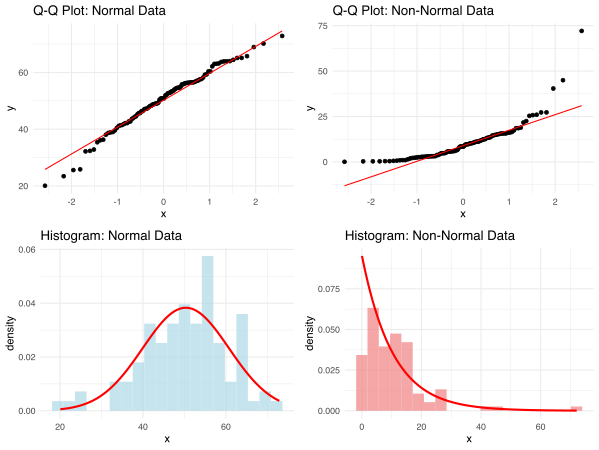
This calculator helps you assess whether your data follows a normal distribution using three powerful statistical tests: Shapiro-Wilk, Kolmogorov-Smirnov, and Anderson-Darling. It also generates Q-Q plots and histograms to visualize your data distribution. Normality is a crucial assumption for many parametric statistical procedures, including t-tests, ANOVA, and linear regression. Simply input your data, select the column to analyze, choose which tests to run, and get comprehensive results with visual plots to help you make informed decisions about your data.
Normality tests help determine whether your sample data comes from a normally distributed population. This is a critical assumption for many statistical procedures, including t-tests, ANOVA, and linear regression. Different normality tests have varying sensitivities and are better suited for different scenarios and sample sizes.
Best for:
How it works:
The test statistic W compares the ordered sample values with the corresponding normal order statistics. Values close to 1 indicate normality.
Key strengths:
Best for:
How it works:
The K-S test compares your empirical distribution function with the cumulative distribution function of the reference distribution (normal). The test statistic D is the maximum vertical distance between these functions.
Key strengths:
Best for:
How it works:
A modification of the Kolmogorov-Smirnov test that gives more weight to the tails of the distribution. The test statistic A² measures the integrated squared difference between the empirical and theoretical distribution functions.
Key strengths:
All normality tests use the following hypothesis structure:
The significance level (typically 0.05) is your threshold for rejecting the null hypothesis of normality.
Apply mathematical transformations to normalize your data:
Use tests that don't assume normality:
Use procedures less sensitive to non-normality:
The performance of normality tests varies significantly with sample size:
| Sample Size | Approach |
|---|---|
| n < 30 | Use Shapiro-Wilk test + Q-Q plots |
| 30 ≤ n < 100 | Use any test, with visual confirmation |
| 100 ≤ n < 300 | Prioritize visual methods over test p-values |
| n ≥ 300 | Rely on Central Limit Theorem or use visual methods |
library(nortest)
library(ggplot2)
library(gridExtra)

# normal data
set.seed(42)
normal_data <- rnorm(100, mean = 50, sd = 10)

# non-normal
set.seed(123)
non_normal_data <- rexp(100, rate = 0.1)

print("=== NORMAL DATA ===")
shapiro.test(normal_data)
ks.test(normal_data, "pnorm", mean = mean(normal_data), sd = sd(normal_data))
ad.test(normal_data)

print("=== NON-NORMAL DATA ===")
shapiro.test(non_normal_data)
ks.test(non_normal_data, "pnorm", mean = mean(non_normal_data), sd = sd(non_normal_data))
ad.test(non_normal_data)


p1 <- ggplot(data.frame(sample = normal_data), aes(sample = sample)) +
  stat_qq() + stat_qq_line(color = "red") +
  ggtitle("Q-Q Plot: Normal Data") +
  theme_minimal()

p2 <- ggplot(data.frame(sample = non_normal_data), aes(sample = sample)) +
  stat_qq() + stat_qq_line(color = "red") +
  ggtitle("Q-Q Plot: Non-Normal Data") +
  theme_minimal()

p3 <- ggplot(data.frame(x = normal_data), aes(x = x)) +
  geom_histogram(aes(y = after_stat(density)), bins = 20, alpha = 0.7, fill = "lightblue") +
  stat_function(fun = dnorm, args = list(mean = mean(normal_data), sd = sd(normal_data)),
                color = "red", linewidth = 1) +
  ggtitle("Histogram: Normal Data") +
  theme_minimal()

p4 <- ggplot(data.frame(x = non_normal_data), aes(x = x)) +
  geom_histogram(aes(y = after_stat(density)), bins = 20, alpha = 0.7, fill = "lightcoral") +
  stat_function(fun = dexp, args = list(rate = 1/mean(non_normal_data)),
                color = "red", linewidth = 1) +
  ggtitle("Histogram: Non-Normal Data") +
  theme_minimal()

grid.arrange(p1, p2, p3, p4, ncol = 2)