A density plot is a visualization that shows the distribution of a continuous variable. It uses kernel density estimation (KDE) to create a smooth curve that represents the probability density function of the variable. Density plots are useful for understanding the shape of your data, detecting patterns, and comparing distributions. Try the plot maker using the sample dataset named "tips" and select the "total_bill" column.
Leave empty for automatic selection
A density plot uses kernel density estimation (KDE) to visualize the distribution of a continuous variable. It creates a smooth curve by placing a kernel (probability density function) at each data point and summing them together. This creates a continuous estimation of the probability distribution that generated your data.
Unlike histograms which use discrete bins, density plots show a smooth estimation of the distribution, making it easier to identify patterns, skewness, and multimodality.
R provides excellent tools for creating density plots. Here's an example using ggplot2:
library(tidyverse)

# load tips dataset
tips <- read.csv("https://raw.githubusercontent.com/plotly/datasets/master/tips.csv")

# density plot with rug plot and normal curve
ggplot(tips, aes(x = total_bill)) +
  geom_density(fill = "skyblue", alpha = 0.5) +
  geom_rug(alpha = 0.5) +
  stat_function(
    fun = dnorm,
    args = list(mean = mean(tips$total_bill), sd = sd(tips$total_bill)),
    lty = 2, color = "red"
  ) +
  labs(title = "Density Plot of Total Bill Amount",
       x = "Total Bill ($)",
       y = "Density") +
  theme_minimal()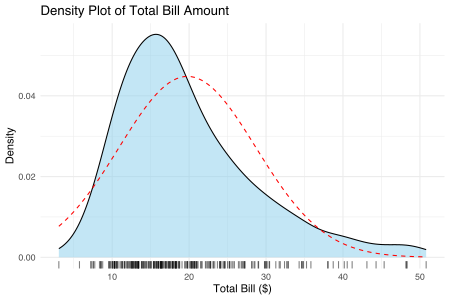
This code creates a density plot for the 'total_bill' variable from a restaurant tips dataset. The red dashed line represents a normal distribution with the same mean and standard deviation.
Density plots are particularly useful in these situations:
